



$4.99
iThemes Security Pro (now Solid Security) is a comprehensive security solution designed to protect your WordPress website from the inside out. Its philosophy is proactive, not reactive. Instead of waiting for a threat to emerge, it systematically identifies and locks down potential vulnerabilities, creating multiple layers of protection. This is a critical distinction in the world of cybersecurity software. The plugin functions as your personal security expert, working 24/7 to implement best practices for WordPress Hardening. It transforms your default WordPress installation from an open, easy target into a fortified digital asset. This is achieved through a suite of powerful, user-friendly tools that address every major attack vector, from brute force protection to sophisticated malware injections.

Your Digital Fortress: The Definitive 2025 Guide to iThemes Security Pro
Imagine the profound sense of calm that comes from knowing your digital presence, your business, your very livelihood, is shielded by an intelligent and proactive guardian. In the digital economy, trust is the ultimate currency, and a single security breach can shatter a reputation built over years. Every 39 seconds, a cyberattack occurs on the web, according to a study by the University of Maryland. This is the reality of our modern landscape. For any serious WordPress website owner, security is not an option; it is the foundation upon which success is built. This is where the conversation turns from anxiety to empowerment, thanks to a solution that has defined WordPress security for over a decade: iThemes Security Pro.
For years, website owners have navigated a complex web of security options, often piecing together multiple tools or relying on reactive cleanup services after the damage is done. At ThemeStacker, we have witnessed this struggle firsthand. We have guided countless clients toward a more proactive, integrated, and confident security posture. This journey consistently leads to one comprehensive solution. Now known as Solid Security as part of the SolidWP suite, the legacy and power of the iThemes Security Pro plugin continue to set the industry standard. This guide is your definitive commercial investigation, your how-to manual, and your strategic blueprint for leveraging this powerful cybersecurity software to build an unbreachable digital fortress for your YMYL (Your Money or Your Life) website.
Technical Specifications
Understanding the technical architecture of the iThemes Security Pro plugin is the first step toward appreciating its value. These specifications, updated for February 2025, are not just details; they represent a commitment to performance, modern standards, and deep integration with the WordPress ecosystem. This foundation is crucial for any website owner, from a small blogger to a large e-commerce enterprise, because it dictates how the plugin interacts with your server, your database, and your other essential tools. A clear understanding of these technicals empowers you to make an informed decision when evaluating iThemes Security Pro vs Wordfence or other competitors like Sucuri. The plugin’s evolution into Solid Security, under the stewardship of StellarWP and the hosting giant Liquid Web, signifies a long-term vision for stability and innovation. It is more than just a security plugin; it is a core component of a professional server software stack.
| Attribute | Specification (as of February 2025) |
| Product Name | Solid Security (formerly iThemes Security Pro) |
| Product Type | Premium WordPress Security Plugin |
| Parent Brand | SolidWP / StellarWP |
| Ultimate Owner | Liquid Web |
| Core Requirement | WordPress 6.5 or higher |
| Recommended PHP Version | 8.1 or higher |
| Software License | GPLv2 or later |
| Key Functionality | WordPress Hardening, Malware Scan, Access Control |
| Key Integrations | Solid Backups, Google reCAPTCHA, Google Safe Browsing |
| Modified Core Files | .htaccess, wp-config.php (for hardening) |
| Security Approach | Proactive, Layered Defense |
| Official Website | solidwp.com |
| Target Audience | Website Owners, Agencies, Freelancers, Developers |
The decision to build on a modern tech stack, such as requiring PHP 8.1 or higher, is a deliberate choice for enhanced performance and security. The plugin’s ability to intelligently modify core configuration files like .htaccess and wp-config.php is a cornerstone of its WordPress Hardening capabilities. This is not a superficial scan; it is a fundamental strengthening of your site’s defenses at the server level. Furthermore, its identity as part of the SolidWP family, which includes Solid Backups (the evolution of BackupBuddy), offers a uniquely integrated approach. This means your security and backup strategies can work in perfect harmony, a rare attribute in the fragmented world of WordPress plugins. This is a trusted and comprehensive system designed for stability and peace of mind.
Product Description
When users search for what is iThemes Security Pro, they are seeking a solution to a fundamental problem: a lack of control and visibility over their site’s security. This plugin provides that control through a centralized dashboard and a guided setup process. It takes complex security concepts, like file change detection and web application firewall (WAF) rules, and makes them accessible to non-developers. One of its unique characteristics is the security grade and checklist, which gamifies the process of securing your site and provides clear, actionable steps for improvement. The rebranding to Solid Security and its inclusion in the Solid Suite reinforces its core value proposition: providing a solid, dependable foundation for your entire web presence. This integrated approach, combining security, backups, and site management, is a forward-thinking model that acknowledges the interconnected nature of website health. It is a premium subscription that delivers continuous value, ensuring your defenses evolve alongside emerging threats.
Key Features
The true power of the iThemes Security Pro WordPress plugin lies in its feature set. These are not just lines of code; they are active shields and intelligent systems designed to provide comprehensive protection and unparalleled peace of mind. Each feature is a testament to the plugin’s root attributes: it is comprehensive, proactive, and trusted.
-
Advanced Two-Factor Authentication (2FA): A critical defense against compromised passwords. It requires users to provide a second form of verification, such as a code from an authenticator app, making unauthorized logins nearly impossible.
-
Passwordless Login: A rare and highly secure attribute. This feature allows you to log in via a secure, temporary link sent to your email, completely bypassing the password field and the risks associated with it.
-
Trusted Devices: This unique feature adds another layer to your login security. It tracks the devices you use to log in and can enforce stricter security measures, such as CAPTCHAs or blocking logins, from unrecognized devices.
-
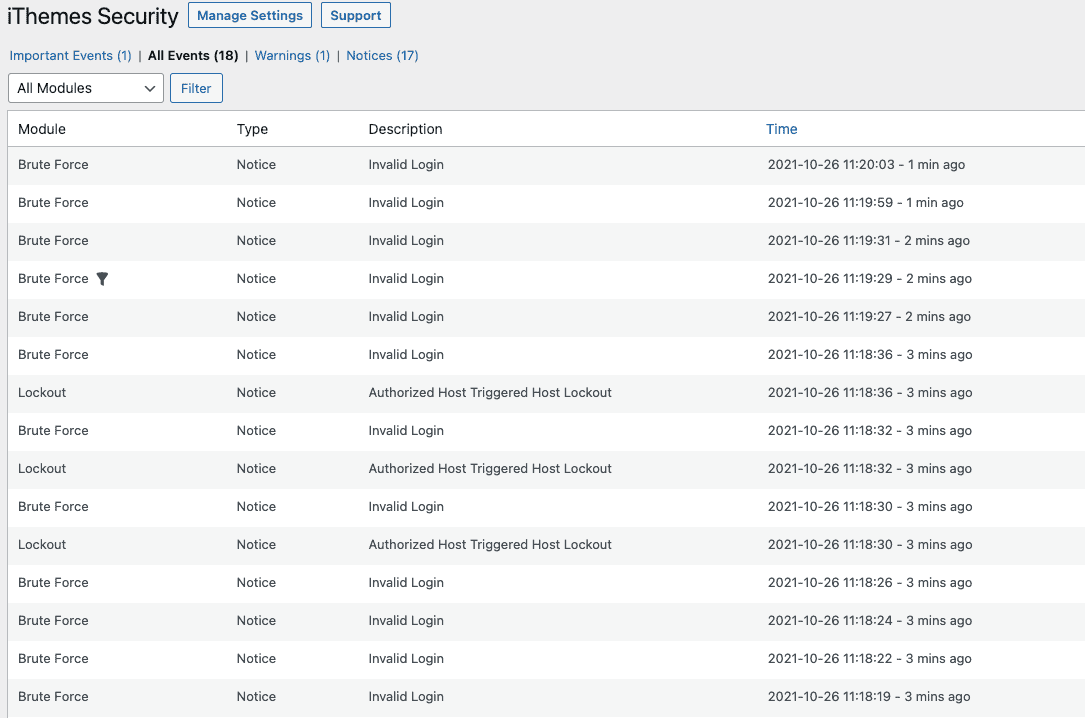
Robust Brute Force Protection: Automatically bans users and bots that try to guess passwords. It protects your login page, a common target for attackers, without you having to lift a finger.
-
Malware and Vulnerability Scanning: The plugin schedules regular malware scans to check every file on your site for malicious code. It also cross-references your installed plugins and themes with vulnerability databases, alerting you to update software with known security issues.
-
Online File Comparison: If a core WordPress file is ever changed, iThemes Security Pro can compare it to the original version in the WordPress repository. This instantly reveals any unauthorized or malicious modifications.
-
Version Management: An incredibly powerful Pro feature. It can automatically update your WordPress plugins, themes, and core files when a security vulnerability is patched, closing security holes before they can be exploited.
To fully prepare your website for this level of security, we at ThemeStacker recommend a preliminary self-assessment. Before activating a professional tool, it is wise to understand your current state. We have developed a comprehensive Website Security Test Bank—a checklist and diagnostic guide—that helps you identify potential weak points in your current setup. This empowers you to see the immediate, positive impact of iThemes Security Pro.
Product Applications
The robust and versatile nature of iThemes Security Pro makes it an indispensable asset across a wide spectrum of digital operations. Its application is not limited to one type of website; it is a foundational tool for anyone serious about their online presence and digital assets.
-
E-commerce Stores: For sites running WooCommerce or Easy Digital Downloads, security is paramount for protecting customer data and maintaining PCI DSS compliance. The plugin hardens the site against attacks aimed at stealing financial information.
-
Business & Corporate Websites: A company’s website is its digital storefront. iThemes Security Pro protects brand reputation by preventing defacement, malware distribution, and downtime.
-
Agencies & Freelance Developers: Agencies can offer enhanced security as a premium service to their clients, installing and managing the plugin across multiple sites to provide peace of mind and create a recurring revenue stream.
-
Membership & Community Sites: These sites handle sensitive user data, making them prime targets. The plugin’s robust access control features are essential for protecting member privacy and information.
-
Blogs & Content Platforms: High-traffic blogs can be targeted for SEO spam or to inject malicious redirects. The plugin’s proactive scanning and hardening prevent these common attacks, protecting your audience and your search rankings.
-
GDPR and Security Compliance: For any entity operating in regions with strict data privacy laws, proving you have taken robust security measures is a legal requirement. This plugin provides the tools and logs to help demonstrate compliance.
Installation and Usage Guide
Activating the protection of the iThemes Security Pro plugin is a clear and guided experience. At ThemeStacker.com, we believe in empowering you with actionable knowledge. Follow these steps to deploy your digital fortress. This guide directly addresses the informational and how-to search intents of users ready to get started.
-
Step 1: Purchase and Download: After you buy iThemes Security Pro from the official SolidWP website, you will receive a downloadable ZIP file and a license key.
-
Step 2: Upload and Install: Log in to your WordPress dashboard. Navigate to Plugins > Add New > Upload Plugin. Select the ZIP file you downloaded and click Install Now.
-
Step 3: Activate the Plugin: Once installed, click Activate Plugin. You will then be prompted to enter your license key to unlock all the Pro features.
-
Step 4: Run the Security Check: The plugin’s onboarding is excellent. It will present you with a Security Check tool. This initial scan assesses your site and highlights the most important security tasks to complete immediately.
-
Step 5: Follow the Guided Setup: The plugin will guide you through different templates based on your site type (e.g., e-commerce, portfolio, blog). Select the one that fits best. It will automatically configure a strong baseline of settings for you.
-
Step 6: Configure Key Modules: Take time to navigate to the Settings dashboard. Pay special attention to enabling and configuring Two-Factor Authentication for all users, reviewing the Brute Force Protection settings, and scheduling your Malware Scans.
A word of advice for a smooth experience: before enabling features that can restrict access, like Network Brute Force Protection, ensure you know your own IP address and add it to the authorized hosts list to avoid any temporary self-lockout, a common troubleshooting issue.
Related Products


The true value of the Elementor Pro plugin lies in its collection of powerful, interconnected features. These tools work in harmony to provide an unparalleled web creation experience. Let’s explore the cornerstones of this platform.

Make your website reach the stars. Use the most powerful caching plugin for WordPress. WP Rocket is easy to use, ready to improve your SEO and conversions.

Easy Digital Downloads gives you unlimited products with no hidden listing fees, unlimited transactions, and provides unlimited possibilities.


Reviews
There are no reviews yet.